Desired State Configuration #3 – Details about SQL Server Installation with murphy’s law
Björn Peters
8. July 2019

This post will delve deeper into how I tailored my Desired State Configuration scripts to facilitate the copy and preparation processes for my Desired State Configuration (DSC) SQL Server rollout. Following the initial two blog posts where I discussed the preparations and fundamentals of the deployment, today I’ll walk you through the actual installation as per my implemented approach (with a potential alternative for future exploration—time permitting, of course).
Script Optimization for Seamless Deployment
As of writing this post, my scripts are in a “working” state. They can efficiently create necessary folders from a central server onto one or more servers. These scripts seamlessly copy required files such as the ISO image, updates, PowerShell modules, and more to the target server. Subsequently, they installed SQL Server 2017, incorporating the latest patch level, and configured the SQL Server based on best practice requirements.
Configuration Snapshot with Desired State Configuration
Building on the foundation laid in the second part of the DSC series, I’ve successfully copied all essential files using my DSC configuration. This includes the current ISO image of SQL Server 2017 and the last cumulative update, all neatly organized on the destination server. (Refer to the screenshot below, where only the TARGET state was checked, and no actions were necessary.)

Prerequisites for Setup
To kickstart the setup from the current script state, we need the following components:
- The ISO-Image (en_sql_server_2017_developer_x64_dvd_11296168.iso)
- The latest patch (SQLServer2017-KB4466404-x64.exe)
- The ConfigurationFile.ini
- Necessary PowerShell modules (e.g., dbatools, SecurityPolicyDsc, SqlServerDsc …)
In the “ConfigData.psd” file, I’ve documented all the essential configuration variables, values, and roles required during the setup. While the current example maintains identical variables and values across all servers, variations may exist in other environments.
@{
    AllNodes = @(
        @{
            NodeName        = "*"
            PSDscAllowPlainTextPassword = $true
            PSDscAllowDomainUser =$true
            SQLInstallPath     = "D:\SQL2017"
            InstanceName    = "MSSQLServer"
        },
        @{
            NodeName        = "sqlvm01"
            Role            = "SqlServer"
        },
        @{
            NodeName        = "sqlvm02"
            Role            = "SqlServer"
        }
        @{
            NodeName        = "sqlvm03"
            Role            = "SqlServer"
        }
        @{
            NodeName        = "sqlvm04"
            Role            = "SqlServer"
        }
    )
}
Everything’s Broken – Challenges Faced and Lessons Learned
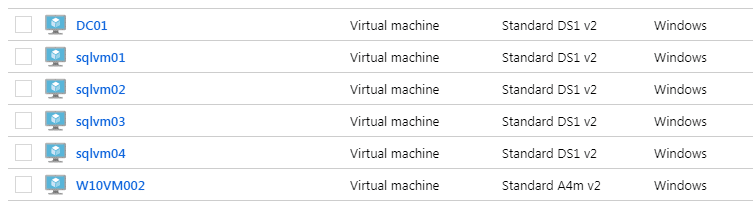
Despite Murphy’s law intervening, my scripts worked seamlessly on test machines sqlvm01 and sqlvm02. However, challenges arose with sqlvm03 and sqlvm04. The journey involved enabling Network Discovery, integrating and formatting all discs, and joining the target domain. Despite running identical preparation scripts on all four servers, the script resource encountered issues from the domain controller to the target server during the push configurations.
Resetting – everything back to 0.25
In a turn of events for the worse, with no backups, I accidentally deleted critical script folders, leading to a significant setback. Learning from this, I utilized the opportunity to revamp my development environment. A fresh start involved setting up a new Windows Server 2016 and a Windows 10 machine for script development.
Striving for Automation
In pursuing an automated SQL server installation with Desired State Configuration, I had to restart the process with a slightly different approach. Creating backups from a “blank machine” for faster recovery became my first lesson. The second lesson involves scripting every aspect of the process, a topic I’ll explore in a future blog post.
Returning to Desired State Configurations, I drew inspiration from Chris Lumnah’s blog and an introduction to DSC from the Microsoft Virtual Academy. My adaptation focuses on leveraging the “correct” SQL Server DSC resource, deviating from the traditional DSC Script resource.
Stay tuned for the next blog post as I recount spending another day setting up everything anew with my updated DSC scripts. Apologies for the inconvenience, and thank you for your understanding!
AUTHOR
Björn Peters
Björn works as a Senior Consultant with a focus on the Microsoft Data Platform, SQL Server, PowerShell, and Azure SQL. He helps customers with operations, migrations, high availability, performance analysis, and troubleshooting.
On SQL from Hamburg, he writes about lessons learned from real-world projects – practical, technical, and with the goal of making complex problems easier to understand. Beyond SQL Server, he enjoys science fiction, baking, and cycling.